

calculation_code expression. Choose the output field type to match the result: use Number for an amount or count, Boolean for a clear true/false result, Text for a short displayed value, and so on. A serial reference should use its dedicated serial configuration rather than a calculation that imitates issuance.
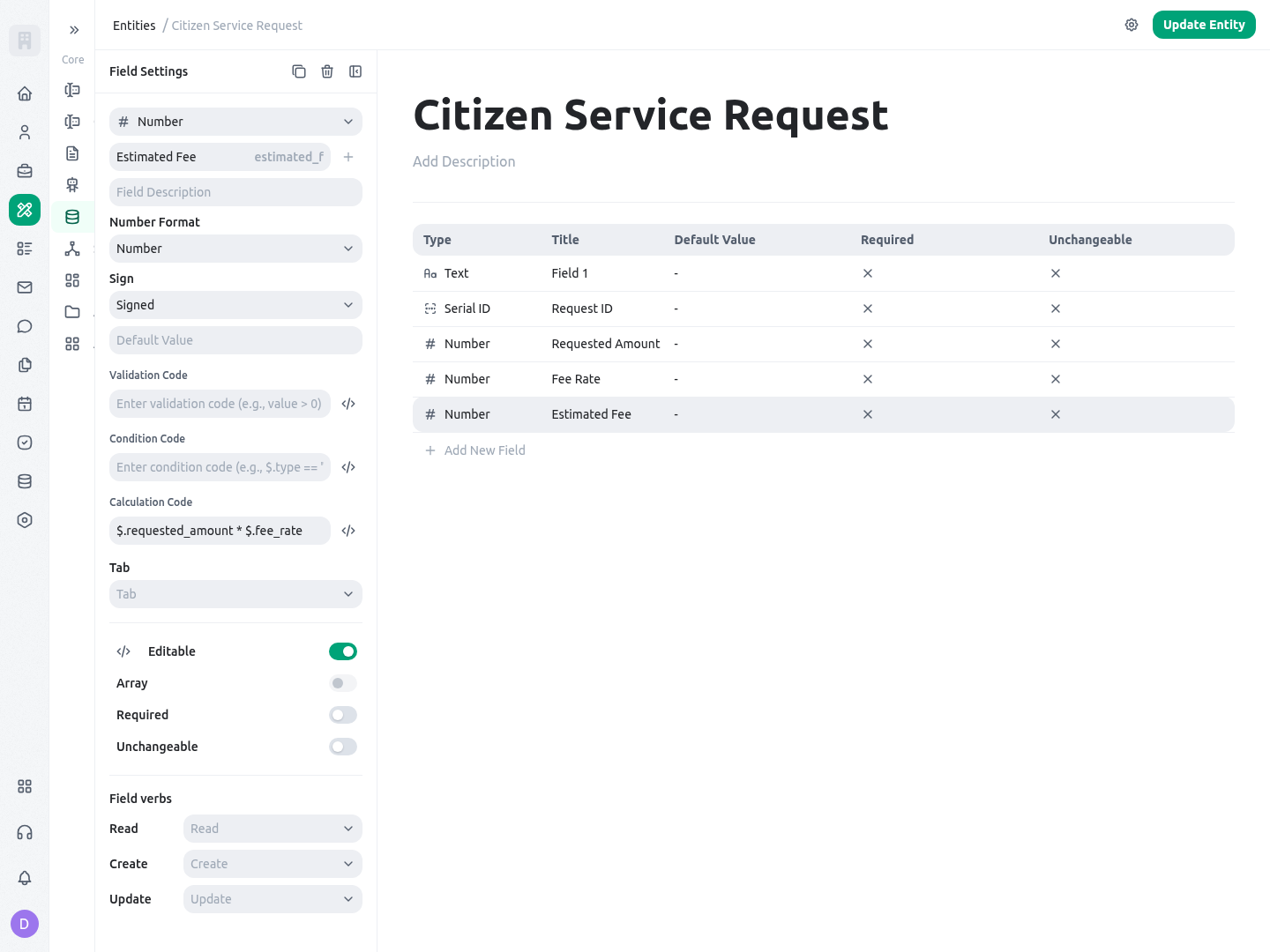
The captured builder view below shows the Estimated Fee number field on the Citizen Service Request entity with its calculation expression. It is an example of selecting the ordinary output type first, then attaching the calculation rule to that field.
When to use it
Use a calculated field when the result is deterministic from data that the record already holds or is configured to resolve. Good candidates include a service fee from an amount and rate, a completeness flag from structured intake data, an inspection count, an elapsed-workload score, or a reporting category derived from approved inputs. Use a different mechanism when the work needs judgment, authority, or an external event:
Keep inputs visible and named for their business meaning. A field named
requested_amount and another named fee_rate make the rule reviewable; one opaque JSON payload does not. Do not make people enter a value that the calculation immediately overwrites. If the source data is incomplete, decide whether the result should be null, whether a validation should stop the record, or whether a human must provide a separate decision.
Configuration
Choose the output field, then add its calculation expression in the entity builder. The calculation editor validates the expression against the context it provides and shows an error or warning state while you work. That check is useful for misspelled keys and invalid syntax, but it is not proof that live relationship data, permissions, or a later background refresh will behave as expected. Save and test a real non-production record.Context and output behavior
The evaluation context depends on the execution path. Do not assume that a name available while a record is created or updated is also available to the background refresh. The two paths have deliberately different data:
In the synchronous path, KayanOS may make up to one pass per calculated field and stops when a pass makes no change. The expression result is compared with the current value; when it differs and is defined, the updated value is placed into the record data used by that create/update flow. A result of
undefined, or an evaluation error, is skipped rather than written as a new value. The background job takes a different approach: it evaluates each calculated field once in dependency order, then writes changed results together. That makes defensive null handling important: a silent blank may be safer than a wrong amount, but it can leave an earlier result in place until the source data is corrected.
Start with a local calculation that has no relationship dependency:
requested_amount equal to 250000 and fee_rate equal to 0.03, the expected Number result is 7500. Both source fields should be Number fields. If a rate is optional, explicitly choose a fallback rather than accidentally multiplying text, null, or a missing value.
Direct relations and inverse relations
A direct-relation formula only sees$relations in a normal create or update when the surrounding validation has resolved that relation context. The background job resolves only the direct relationship fields configured for calculated-field refresh. For a single relation such as service_category, $relations.service_category is either the related record object or null. For an array relation, the same key resolves to an array. Protect a relation access with a guard:
0.03 and requested amount 250000, the expected result is 7500; without a category or rate, the expected result is null. Use the stored field keys of the related entity, not labels shown to staff.
Inverse relations answer a different question: which other records point back to this record? They are background-path data, not a guaranteed synchronous context: during normal create and update, $inverseRelations is empty. Configure the inverse relationship on the entity before using it, then use the expression only where the configured background refresh is part of the design. In that background path, the values are arrays under the inverse entity key and its relation field key. Use the registered length(...) helper to count the array:
request_reference, the expected Number result is 3 after the configured background recalculation. The keys inspections and request_reference in this example must match the configured inverse entity and field keys exactly. Do not write an aggregate against an inverse path until you have verified the saved configuration and refreshed parent record.
There are two important timing paths. During create and ordinary update, KayanOS evaluates local data, any resolved direct relations, $value, and applicable status-template context; it has no inverse-record collection. The background calculate_entity_fields job reads configured direct and inverse relations, omits $value and $statusTemplates, recomputes each output once in dependency order, and logs evaluation errors. A rule that relies on inverse records should be verified after the background recalculation; do not assume that adding a child record instantly refreshes the parent’s inverse count in every path.
Dependencies, cycles, and status context
Background refresh detects local calculated dependencies written as$.field_key and evaluates them before the dependent field, including a calculated rollup used by another formula. Use that dot notation for supported local chains. Bracket notation and relation paths do not establish the same local dependency. If a dependency has no usable newly computed result, the stored value may be used, so inspect failures and stale inputs.
Avoid circular dependencies. Fields in a cycle, and fields depending on that cycle, run last without calculated keys in their context; this does not solve the cycle. Test a changed source, a missing value, and a failed dependency after background refresh before relying on a derived decision.
Status-template information can be supplied by the server during the synchronous path when a field uses the relevant status-template configuration. It is not supplied to the background job. Treat it as contextual data, not as an authorization shortcut; if a rule depends on a status template, test the exact template selection, record state, and refresh behavior that will be used at runtime.
Client projection is not the calculation authority
KayanOS can omit calculated values and calculated table-column metadata from client payloads, then recompute authoritative outputs on trusted server paths. This prevents a stale or user-modified client projection from becoming the source of a saved calculated result. It also means a calculated value that is absent from the browser payload is not necessarily missing from the record’s server-side calculation contract. Do not use a hidden calculated value for client-side authorization, page visibility that must be enforced securely, or approval evidence. Base those decisions on permitted source fields and server-validated workflow state. When a calculated table result matters to a document or decision, verify the saved or recomputed server value and the inputs that produced it rather than copying a value from browser state.Worked example
A public-service directorate in Syria manages citizen requests for a local service. Each request includesrequested_amount, fee_rate, a relation to service_category, and related inspection records. The service owner wants staff to see the estimated fee, a review flag, and the number of completed inspection records without retyping any result.
Create these output fields:
For the first version, keep the rate directly on the request and use a simple calculation:
requested_amount of 250000 and fee_rate of 0.03, estimated_fee becomes 7500. Place the result beside the source amount in the review layout, and keep both inputs visible so a reviewer can explain the number.
Then define a clear Boolean threshold directly from the same source values:
needs_fee_review is false; when the amount and rate produce a fee of 12500, it is true. This is deliberately not $.estimated_fee >= 10000: a synchronously calculated estimated_fee can be visible during one validation pass, but the background path removes calculated outputs before it evaluates the threshold. Configure the business process so a true flag leads to a visible review task or status step. The field itself does not assign a reviewer or grant approval.
If fee policy is stored on the related service_category record, replace the first formula with the guarded direct-relation form from the Configuration section. Test a request with no category, a category with no rate, and a category with a valid Number rate. If the relationship changes later, run the relevant recalculation check and verify the stored fee before producing a decision document.
Finally, configure the inverse inspections.request_reference relationship only if the directorate needs the stored count for dashboards or reporting. Create one request, attach three inspection records, run or wait for the configured background recalculation, and confirm inspection_count is 3. A count is operational information; it is not proof that each inspection was accepted. Keep the inspection result and decision status in their own controlled fields.
Testing
Test calculations with a small non-production set that includes normal, empty, changed, and relationship cases. Write down both source values and expected stored results. Test a saved record, not only the editor indicator, because the editor can validate syntax while live data has a different relationship shape or missing value.
Use a conservative relation test expression before adding arithmetic:
fee_rate is 0.03, the expected result is 0.03; with no related category, it is null. After this succeeds, add multiplication and threshold logic one expression at a time. For an inverse count, test the exact saved configuration rather than guessing the entity or field key from its screen title.
Troubleshooting
Permissions and data-quality limits
Only people with appropriate builder access should configure calculation code, relation definitions, and layouts. Members who create or update a record still need the normal entity permissions; a calculated field does not bypass field visibility, record scope, or update authorization. Treat a value produced in one synchronous pass as a result for that operation, not as a permission-approved guarantee that another calculated field will persist it after background refresh. Test with representative roles, especially where a result could reveal a restricted amount, person, category, or inspection outcome. Derived data can leak source data. For example, a Boolean flag can reveal whether a confidential threshold was exceeded, and a count can reveal that related records exist. Do not expose a calculated field in a public or broad staff layout until the service owner has reviewed both the source fields and what the derived result reveals. Do not put secrets, tokens, or personal identifiers into expression text or output values. Keep the formula small enough for a policy owner to read. Pair every meaningful calculation with a field description that says what it represents, its unit, its fallback for missing data, and the action staff should take when it is unusual. Calculations increase consistency; they do not validate an untrustworthy source, replace approval, guarantee a timely inverse refresh, or preserve a calculated-on-calculated dependency across a background pass.Related guides
- Select suitable output and source field types in Entity fields and layouts.
- Learn complete expression syntax and helper behavior in Expression language syntax.
- Design direct and inverse relationships in Entities.
- Use issued, auditable human references in Serial IDs.