When to use these helpers
Use ISO-like date values where possible and test the expression in the same field, form, or template context where it will run. Formatting is presentation; comparisons and calculations should use the underlying date value.Calling style
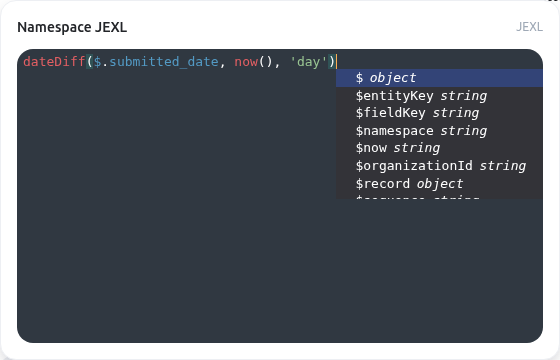
Call a helper asdateFormat($.submitted_at, "YYYY-MM-DD"). Not every helper is available everywhere: validation, form, and document-template helpers have distinct context contracts. Editor suggestions are not proof that a helper is supported at runtime.
Complete function reference
addDays
Adds a specified number of days to a date
Signature: addDays(date, days)
Example:
value | addDays(...).
addHours
Adds a specified number of hours to a date
Signature: addHours(date, hours)
Example:
value | addHours(...).
addMinutes
Adds a specified number of minutes to a date
Signature: addMinutes(date, minutes)
Example:
value | addMinutes(...).
addMonths
Adds a specified number of months to a date
Signature: addMonths(date, months)
Example:
value | addMonths(...).
addYears
Adds a specified number of years to a date
Signature: addYears(date, years)
Example:
value | addYears(...).
date
Constructs a date from components (UTC-normalized wall time)
Signature: date(year, month, day, hour?, minute?, second?, millisecond?)
Example:
value | date(...).
dateAdd
Adds an amount to a date by unit
Signature: dateAdd(date, amount, unit)
Example:
value | dateAdd(...).
dateDiff
Returns the integer difference between two dates in the specified unit
Signature: dateDiff(date, other, unit)
Example:
value | dateDiff(...).
dateFormat
Formats a date using tokens YYYY, MM, DD, HH, mm, ss, SSS (UTC)
Signature: dateFormat(date, format)
Example:
value | dateFormat(...).
dateFromString
Creates a date from a string
Signature: dateFromString(str)
Example:
value | dateFromString(...).
dateFromTime
Creates a date from a time string (hh:mm or hh:mm:ss)
Signature: dateFromTime(time)
Example:
value | dateFromTime(...).
dateFromTimestamp
Creates a date from a numeric timestamp (ms)
Signature: dateFromTimestamp(timestamp)
Example:
value | dateFromTimestamp(...).
dateParse
Parses a date from a tokenized format string
Signature: dateParse(str, format)
Example:
value | dateParse(...).
dateSubtract
Subtracts an amount from a date by unit
Signature: dateSubtract(date, amount, unit)
Example:
value | dateSubtract(...).
day
Returns UTC day of month
Signature: day(date)
Example:
value | day(...).
dayOfYear
Returns the day of the year for a given date
Signature: dayOfYear(date)
Example:
value | dayOfYear(...).
daysInMonth
Returns the number of days in a given month of a year
Signature: daysInMonth(year, month)
Example:
value | daysInMonth(...).
diffDays
Calculates the difference in days between two dates
Signature: diffDays(date1, date2)
Example:
value | diffDays(...).
diffHours
Calculates the difference in hours between two dates
Signature: diffHours(date1, date2)
Example:
value | diffHours(...).
diffMinutes
Calculates the difference in minutes between two dates
Signature: diffMinutes(date1, date2)
Example:
value | diffMinutes(...).
endOfDay
Returns the end of the day for a given date
Signature: endOfDay(date)
Example:
value | endOfDay(...).
endOfMonth
Returns the end of the month for a given date
Signature: endOfMonth(date)
Example:
value | endOfMonth(...).
endOfWeek
Returns the end of the week for a given date
Signature: endOfWeek(date)
Example:
value | endOfWeek(...).
endOfYear
Returns the end of the year for a given date
Signature: endOfYear(date)
Example:
value | endOfYear(...).
formatDateTime
Formats a date and time together
Signature: formatDateTime(date, dateStyle?, timeStyle?, locale?)
Example:
value | formatDateTime(...).
formatFull
Formats a date as a full date string
Signature: formatFull(date, locale?)
Example:
value | formatFull(...).
formatLong
Formats a date as a long date string
Signature: formatLong(date, locale?)
Example:
value | formatLong(...).
formatMedium
Formats a date as a medium date string
Signature: formatMedium(date, locale?)
Example:
value | formatMedium(...).
formatShort
Formats a date as a short date string
Signature: formatShort(date, locale?)
Example:
value | formatShort(...).
formatTimeLong
Formats a date as a long time string
Signature: formatTimeLong(date, locale?)
Example:
value | formatTimeLong(...).
formatTimeMedium
Formats a date as a medium time string
Signature: formatTimeMedium(date, locale?)
Example:
value | formatTimeMedium(...).
formatTimeShort
Formats a date as a short time string
Signature: formatTimeShort(date, locale?)
Example:
value | formatTimeShort(...).
getAge
Calculates the age in years from a given date
Signature: getAge(birthDate)
Example:
value | getAge(...).
hour
Returns UTC hour
Signature: hour(date)
Example:
value | hour(...).
isAfter
Checks if a date is after another by unit
Signature: isAfter(date, other, unit)
Example:
value | isAfter(...).
isBefore
Checks if a date is before another by unit
Signature: isBefore(date, other, unit)
Example:
value | isBefore(...).
isLeapYear
Checks if a given year is a leap year
Signature: isLeapYear(year)
Example:
value | isLeapYear(...).
isSame
Checks if two dates are the same by unit
Signature: isSame(date, other, unit)
Example:
value | isSame(...).
isSameDay
Checks if two dates fall on the same calendar day
Signature: isSameDay(date1, date2)
Example:
value | isSameDay(...).
isSameOrAfter
Checks if a date is the same or after another by unit
Signature: isSameOrAfter(date, other, unit)
Example:
value | isSameOrAfter(...).
isSameOrBefore
Checks if a date is the same or before another by unit
Signature: isSameOrBefore(date, other, unit)
Example:
value | isSameOrBefore(...).
isToday
Checks if a given date is today
Signature: isToday(date)
Example:
value | isToday(...).
isTomorrow
Checks if a given date is tomorrow
Signature: isTomorrow(date)
Example:
value | isTomorrow(...).
isValidDatePattern
Validates if a date string matches supported patterns
Signature: isValidDatePattern(dateString)
Example:
value | isValidDatePattern(...).
isYesterday
Checks if a given date is yesterday
Signature: isYesterday(date)
Example:
value | isYesterday(...).
millisecond
Returns UTC millisecond
Signature: millisecond(date)
Example:
value | millisecond(...).
minute
Returns UTC minute
Signature: minute(date)
Example:
value | minute(...).
month
Returns UTC month (1-12)
Signature: month(date)
Example:
value | month(...).
normalizeDateInput
Runs the registered date helper named normalizeDateInput.
Signature: normalizeDateInput(value)
Example:
value | normalizeDateInput(...).
now
Returns the current Date at evaluation time. In a document template, now() is supplied by the render helper; use the stable $now context value when every section needs one captured timestamp.
Signature: now()
Example:
value | now(...).
parseDateString
Validates and parses a date string to a Date or null
Signature: parseDateString(dateString)
Example:
value | parseDateString(...).
parseIsoDate
Parses an ISO date string into a date object
Signature: parseIsoDate(isoDate)
Example:
value | parseIsoDate(...).
second
Returns UTC second
Signature: second(date)
Example:
value | second(...).
startOfDay
Returns the start of the day for a given date
Signature: startOfDay(date)
Example:
value | startOfDay(...).
startOfMonth
Returns the start of the month for a given date
Signature: startOfMonth(date)
Example:
value | startOfMonth(...).
startOfWeek
Returns the start of the week for a given date
Signature: startOfWeek(date)
Example:
value | startOfWeek(...).
startOfYear
Returns the start of the year for a given date
Signature: startOfYear(date)
Example:
value | startOfYear(...).
subtractDays
Subtracts a specified number of days from a date
Signature: subtractDays(date, days)
Example:
value | subtractDays(...).
subtractMonths
Subtracts a specified number of months from a date
Signature: subtractMonths(date, months)
Example:
value | subtractMonths(...).
subtractYears
Subtracts a specified number of years from a date
Signature: subtractYears(date, years)
Example:
value | subtractYears(...).
timestamp
Returns milliseconds since epoch
Signature: timestamp(date)
Example:
value | timestamp(...).
toIsoDate
Converts a date object to an ISO date string
Signature: toIsoDate(date)
Example:
value | toIsoDate(...).
weekOfYear
Returns the week number of the year for a given date
Signature: weekOfYear(date)
Example:
value | weekOfYear(...).
year
Returns UTC full year
Signature: year(date)
Example:
value | year(...).
Before you publish
- Start with a known value and confirm the expected result.
- Handle null, empty text, and empty lists deliberately.
- Do not place secrets, access tokens, or sensitive personal data in an expression.
- Read expression contexts and availability before copying an expression between features.