When to use these helpers
Use these helpers when a field or expression resolves to a list. Treat an empty list as a normal case and explicitly choose what the user should see when there are no related records.Calling style
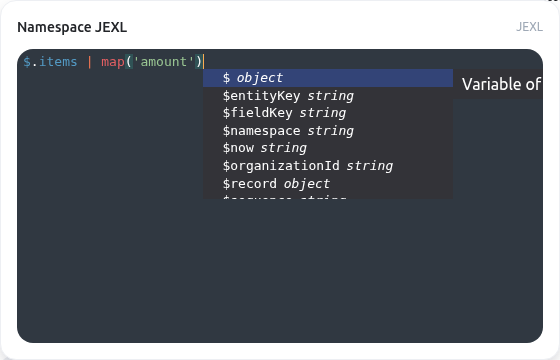
Call a helper assum($.fee_items). Not every helper is available everywhere: validation, form, and document-template helpers have distinct context contracts. Editor suggestions are not proof that a helper is supported at runtime.
Complete function reference
at
Gets the element at a specific index
Signature: at(arr, index)
Example:
value | at(...).
average
Calculates the average of numeric values in an array or spread arguments. When the first argument is an array, it will calculate the average of that array. Otherwise, it will calculate the average of all provided arguments.
Signature: average(...args)
Example:
value | average(...).
chunk
Chunks an array into smaller arrays of specified size
Signature: chunk(arr, size)
Example:
value | chunk(...).
compact
Removes falsy values from an array
Signature: compact(arr)
Example:
value | compact(...).
concat
Concatenates arrays or values. Can accept multiple arrays or a mix of arrays and values.
Signature: concat(...arrays)
Example:
value | concat(...).
countBy
Counts occurrences of each value in an array.
Signature: countBy(arr)
Example:
value | countBy(...).
difference
Gets the difference between arrays or values. When the first argument is an array, compares against other arguments. Otherwise, treats all arguments as arrays to compare.
Signature: difference(...arrays)
Example:
value | difference(...).
every
Checks if all elements in an array are truthy.
Signature: every(arr)
Example:
value | every(...).
fill
Creates an array filled with a specified value.
Signature: fill(value, length)
Example:
value | fill(...).
first
Gets the first element of an array
Signature: first(arr)
Example:
value | first(...).
flatten
Flattens an array by one level
Signature: flatten(arr)
Example:
value | flatten(...).
flattenDeep
Flattens an array recursively
Signature: flattenDeep(arr)
Example:
value | flattenDeep(...).
getByPath
Safely gets value(s) at a dot-notated path from an object or an array of objects
Signature: getByPath(value, path)
Example:
value | getByPath(...).
intersection
Gets the intersection of arrays or values. When the first argument is an array, compares against other arguments. Otherwise, treats all arguments as arrays to compare.
Signature: intersection(...arrays)
Example:
value | intersection(...).
join
Joins an array into a string with a separator
Signature: join(arr, separator?)
Example:
value | join(...).
last
Gets the last element of an array
Signature: last(arr)
Example:
value | last(...).
max
Returns the largest value from an array or variadic values. This is the active array implementation after registration order is resolved.
Signature: max(values) or max(...values)
Example:
value | max(...).
min
Returns the smallest value from an array or variadic values. This is the active array implementation after registration order is resolved.
Signature: min(values) or min(...values)
Example:
value | min(...).
none
Checks if no elements in an array are truthy.
Signature: none(arr)
Example:
value | none(...).
range
Creates an array of numbers within a specified range.
Signature: range(start, end, step?)
Example:
value | range(...).
sample
Gets a random element from an array
Signature: sample(arr)
Example:
value | sample(...).
sampleSize
Gets multiple random elements from an array.
Signature: sampleSize(arr, size)
Example:
value | sampleSize(...).
shuffle
Shuffles an array randomly
Signature: shuffle(arr)
Example:
value | shuffle(...).
slice
Extracts a slice of an array
Signature: slice(arr, start, end?)
Example:
value | slice(...).
some
Checks if any element in an array is truthy.
Signature: some(arr)
Example:
value | some(...).
sortAsc
Sorts an array in ascending order
Signature: sortAsc(arr)
Example:
value | sortAsc(...).
sortBy
Sorts array of objects or primitives by optional field and direction
Signature: sortBy(arr, field?, direction?)
Example:
value | sortBy(...).
sortDesc
Sorts an array in descending order
Signature: sortDesc(arr)
Example:
value | sortDesc(...).
sum
Totals an array or variadic numeric values. Undefined inputs contribute zero, including missing fields projected from related records.
Signature: sum(values) or sum(...values)
Example:
value | sum(...).
union
Gets the union of arrays or values (removes duplicates). Combines all arguments into a single array with unique values.
Signature: union(...arrays)
Example:
value | union(...).
unique
Removes duplicate values from an array
Signature: unique(arr)
Example:
value | unique(...).
zip
Zips multiple arrays together.
Signature: zip(...arrays)
Example:
value | zip(...).
Before you publish
- Start with a known value and confirm the expected result.
- Handle null, empty text, and empty lists deliberately.
- Do not place secrets, access tokens, or sensitive personal data in an expression.
- Read expression contexts and availability before copying an expression between features.