CSR-2026-00042 still carries the formal decision and evidence; the personal profile determines how the authorized member works with it.
Save your signature mark
In your profile’s saved-signature section, draw a mark or upload a PNG or JPEG of at most 2 MiB. Drawn marks are approved when saved. Uploaded images can require an authorized review under the organization’s setting; check whether the mark is approved, pending, or rejected and read the rejection reason. Replace or remove your own mark through this section. A saved image is not a completed signature or permission to sign: return to the authorized document workflow, review the prepared copy, and complete its signing steps.Sign-in locks and partner sign-in
After repeated wrong passwords, the login form can temporarily disable password sign-in and show when to try again. The default is five failures within fifteen minutes and a fifteen-minute lock, subject to deployment policy. Wait for the displayed time, use password recovery, or ask an authorized member administrator to review the lock. An administrator reset requires you to choose a new password at your next sign-in. When a configured partner application sends you to Sign in with Kayanos, check the application named on the login page and use the intended organization account. A signed-in member can continue through the handoff page back to that application. If continuation fails, confirm the organization and account with your administrator. This sign-in path does not provide a member-facing partner-registration or permission-management screen.Choose where you use AI
Your AI settings let you turn individual places on or off, such as writing help, translation, summaries, email insights, and builders. An administrator’s rule for your member takes precedence over the organization rule; either rule overrides your personal choice. A locked setting must be reviewed by an administrator. With no rule or personal choice, the place is on. Enabling a place does not replace its normal permissions, configuration, or usage limits.Secure your account and review devices
Open Account settings → Security to manage passkeys, two-step verification, and your password. Add a passkey through your browser or device prompt, give it a recognizable name, and review whether it is synced or stored on one device. Rename or remove an obsolete key from the list after confirming the selected key. A passkey proves your identity; it does not grant additional member permissions. For an authenticator, start two-step setup, scan the setup code in your authenticator app, and confirm a current code. Store the recovery codes privately before leaving setup. Each recovery code is single-use; generating a new set invalidates the old set. Organization policy may require two-step verification and restrict the allowed methods or trusted-device period. Follow the offered sign-in method if your device cannot use a passkey. Never send an authenticator secret or recovery code to support. Open Devices to inspect your sessions and their recent activity. Use the offered end-session action for a selected device or other devices, checking the confirmation carefully. Sensitive security changes can require a fresh password or passkey check. If a code fails, check the authenticator clock or use an unused recovery code. If a device remains listed after an action, reload and confirm the result before assuming access ended. Return to Security to verify the enabled method and remaining recovery codes.Goal
Select a usable language and interface direction, find the personal settings that affect daily work, understand the boundary between a preference and an organization-controlled setting, and use signature management safely when a formal workflow requires it.What the profile menu contains
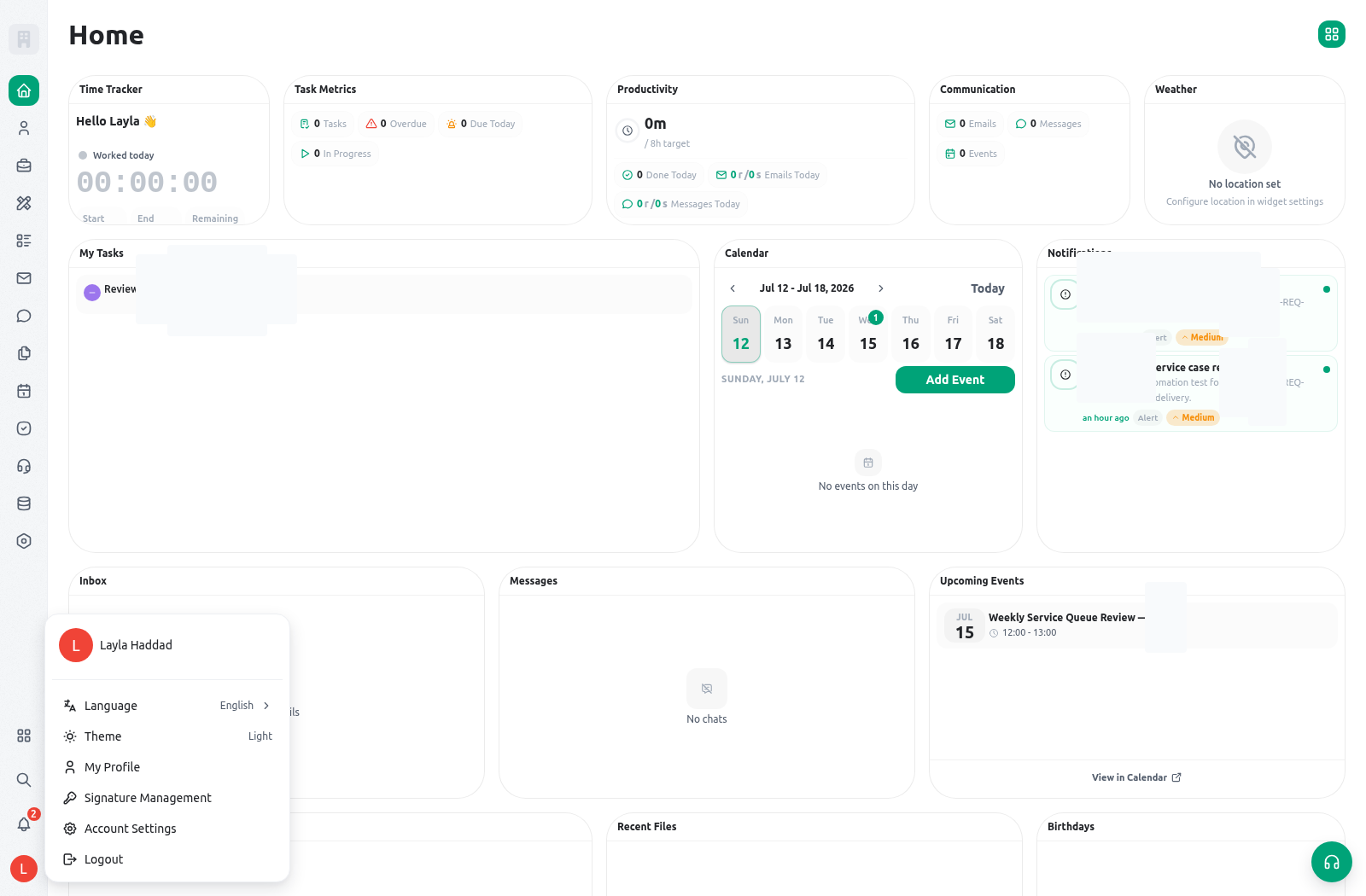
The exact options can vary with deployment and permissions, but the profile menu is the route to these personal areas:Change the interface language
The language selector currently offers English, Arabic, and Turkish. Changing language updates the local application preference and attempts to persist the current member’s preferred language for the active organization when that organization’s language configuration supports it. Arabic uses right-to-left interface direction. To switch safely:- Open the profile menu.
- Open Language and choose Arabic, English, or Turkish.
- Allow the application to reload, then confirm that navigation, labels, and page direction are correct for the selected language.
- Open a known request such as
CSR-2026-00042and confirm that the team can still recognize the record’s fields, status, owner, and serial reference. A language preference changes interface labels, not the underlying field keys or record identity. - If you work in both English and Arabic, agree on stable operational references and status meanings so handoffs remain understandable across interfaces.
Use notification preferences deliberately
Open notification preferences when you need to control how you are alerted to assigned work. Available channels depend on organization setup and channel readiness. For example, an email channel needs a valid, non-suppressed email address; a push channel needs a registered device and permission; other optional channels can require a configured contact path and consent. The preference hierarchy is evaluated from the notification catalog through organization policy to the member setting. Quiet-hours rules apply to external/non-in-app channels according to the configured policy; they do not delay the in-app notification stream. A preference is not proof that an external alert was delivered. For operationally important work, open Home, the task, or the related record and verify the current state. For detailed daily use, see Home and notifications.Understand signature management and formal decisions
Signature management lets a member list and revoke their own signing credentials. It does not create a blanket right to sign any form or record. Whether a member can perform a formal signing action also depends on the configured workflow, the member’s signing capacity, relevant personal or position context, and the record/form permissions. Use this safe sequence when your organization requires a signature:- Confirm that the service policy and configured form/action require a signature rather than a normal task completion or status update.
- Confirm that you are the authorized member for the decision and that the correct personal or position-based signing capacity is in effect.
- Open Signature management from the profile menu to review your own credential list. Do not expose private key material, enrollment codes, or another member’s credentials.
- If a credential is no longer appropriate, revoke your own credential according to the organization’s identity process and notify the responsible administrator when required.
- Return to the configured form or decision workflow and complete the signature only after reviewing the record, evidence, scope, and required data.
- Verify that the workflow records the intended result. A task marked complete, a chat acknowledgment, or a profile setting is not a substitute for the signed outcome.
Sign out across devices
Choose Sign out and confirm when you need to end the account’s KayanOS tenant sessions. A successful sign-out revokes the account’s sessions across organizations, browsers, and other devices, then returns this device to sign-in. It does not remove organization membership, change roles, or sign out another account. KayanOS completes the server-side revocation before clearing this device’s local credentials. If revocation fails, the current local session remains in place and the app shows an error so you can retry. Check connectivity and retry once; if it still fails, report the time and active organization through the approved support path. Do not assume another device was signed out until the action succeeds.Availability and personal boundaries
Every signed-in member can use the profile menu, but a visible menu option does not expand operational authority. Language and theme are personal preferences. Notification channels require configured/eligible contact methods. Signature use requires the organization’s configured identity and formal workflow conditions. Managing a profile does not grant an ability to list, update, share, or approve a service record outside the member’s role and scope. When something is missing, distinguish between:- a personal setting that can be changed by the member;
- an organization policy or language/channel configuration that an administrator must maintain;
- a signing prerequisite that must be satisfied through the approved identity process; and
- a record/form permission that is separate from profile access.
Safe testing
In an organization-approved non-production workspace, switch between English and Arabic and confirm both the page direction and a known service reference. Update an eligible notification preference and verify the in-app result without depending on an external channel. For signatures, use only an organization-approved training workflow with authorized test credentials; do not attempt to copy, share, export, or simulate another member’s identity. To test sign-out, use two test sessions for the same account, complete sign-out in one, and confirm that both require fresh authentication. Do not run this check during unsaved work.Troubleshooting
Related guides
- Start work from Home and notifications.
- Learn formal decision controls in Form actions, logic, and signatures.
- Configure member signing prerequisites in Member keys and signatures.
- Review operational access in Roles and access.