

Filter, calculate, and approve
Choose the month and filter payroll candidates by organizational unit, location, group, and member. The default shows members with approved slips; showing all candidates can reveal draft or missing slips but does not make them payable. Unit and location filters apply to the same position, and only approved slips in the selected scope are included. The same member may appear in separate scoped payrolls; reusing the same salary slip is the conflict. Draft and calculated slips offer calculation or recalculation and approval to members with salary-slip update permission, and deletion with delete permission. If calculation or refresh fails, resolve the error and reopen or recalculate before approving. Missing completed scheduled attendance is calculated on the unpaid-leave basis, taking approved leave and its paid portion into account; a missing row is not automatically a fully paid day. Review the attendance lines and correct the source when needed. Early approval before the period ends asks for confirmation. It freezes the slip; later attendance deductions not already charged can carry to a later slip instead of rewriting the approved result. Review those carried lines and their source periods. Approval also consumes eligible payroll inputs and prevents their reuse. Draft calculations do not reserve inputs.Export the reviewed payroll
From payroll details, choose the member or project view you intend to share, then export PDF. Review the downloaded file, including its period, rows, and totals per currency. Export does not approve the payroll or prove payment. If rendering fails, keep the payroll unchanged and retry after checking the displayed data and service availability.When to use it
Use salary slips to review period data for a member and position: work/leave days, net salary, overtime, bonuses, deductions, totals, notes, amount to be paid, and project percentages. Create a payroll only after the intended members have approved salary slips for the selected month. The creation screen rejects a payroll with no matching approved slips and warns when a selected salary slip is already included in another payroll.Configuration
The payroll creation flow reads approved salary slips for selected members in the selected month. The salary-slip month is derived from its period end for filtering and payroll assembly. Payroll sums amount-to-be-paid when available, otherwise the slip total, and stores the payroll as draft.
Create salary-slip drafts for an exact period
Salary slips are created deliberately; KayanOS does not create a new monthly draft automatically. Choose Create salary slips, select the inclusive period end, then select eligible member and position rows. For a member’s first slip in a position, the start defaults to the assignment start and can be adjusted before creation. After an approved slip exists, the next start is fixed to the day after its end so consecutive approved periods do not leave a gap or overlap. The creation action makes drafts only. A member and position with an existing draft is unavailable until that draft is reviewed or deleted. KayanOS also rejects an end before the start and any period that overlaps another slip for the same member and position. A full recurring cycle, such as 26 August through 25 September, counts as one monthly salary. Other partial periods are prorated across the calendar-month segments they cover, so review the displayed base salary as well as the dates. Open each draft and verify the member, position, assignment, start, end, attendance, leave, adjustments, and project split. Drafts may be deleted only by a member with salary-slip delete capability. Approval freezes the slip identity, period, status, calculated values, and project percentages; an approved slip cannot be deleted or silently regenerated. Correct later attendance or allocation changes through the accountable adjustment process rather than replacing an approved slip. Opening a salary-slip row keeps that slip in the page URL. You can copy that URL to return to the same detail or send it to another authorized reviewer. The link does not grant access: the recipient must already have permission to read the salary slip, and closing the detail removes the slip selection from the URL.Workflow
- Create the required salary-slip drafts for the exact period and eligible member-position assignments.
- Review each slip’s member, position, period, status, work/leave data, adjustment fields, project allocation, and notes, then approve only the intended slips.
- Select payroll members, then select the month and year associated with the approved slips’ period end.
- Resolve any conflict shown for a selected salary slip already included in a payroll. Remove the member only when that is the correct operational decision.
- Create the payroll. KayanOS creates it as draft and links the selected approved salary slips.
- Review the payroll’s period, total, per-member entries, position/location context, and project view.
- A member with payroll update capability can confirm the approval action. Re-open the record and verify that its status changed to approved.
Worked example
The Directorate prepares the September payroll review for the Damascus Regional Service Centre.Members selected: Rania Haddad and Omar Saleh Salary-slip period: 26 August through 25 September Payroll month: September, derived from the period end Prerequisite: both selected members have approved slips for that exact period Result: a September draft payroll with linked slips and a calculated total Review: compare per-member amount, position, leave/work-day context, notes, and any project percentage before approvalIf Rania’s selected salary slip already appears in another payroll, KayanOS reports the conflict. The reviewer must investigate why rather than creating a duplicate. If no selected member has an approved slip for the month, create/review the slips first; the payroll flow does not create a payroll from unapproved or absent slips.
Testing
Use a training or draft workspace with temporary members and non-sensitive values.- Create a first draft for a temporary assignment and confirm its start defaults to the assignment start. Set an exact end and verify the draft period.
- Approve that test slip, create the next draft, and confirm its start is the next calendar day. Verify an overlap and an end-before-start are rejected.
- Leave a known portion of recorded time unallocated to projects and confirm the draft shows project portions plus the no-project remainder before approval.
- Create a payroll for the test members and month associated with the approved slips’ period end, and confirm it begins as draft.
- Attempt a second payroll using the same slip and verify the conflict path appears. Confirm a separate scoped slip for the same member is not treated as a duplicate. Try a member with no approved slip and verify the no-salary-slip message.
- Review the detail before and after an authorized test approval. Confirm the approved slip cannot be deleted or have its period changed.
- Retire draft-only test records according to the organization’s approved cleanup process.
Troubleshooting
Permissions and data-quality limits
Salary slips and payroll have separate entity capabilities. Creating slips requires salary-slip create access; deleting a draft requires salary-slip delete access. Payroll approval in the supplied screen requires payroll update capability. Existing records can also be limited by scope, so a broad job title is not sufficient evidence of access. Payroll and salary-slip data are sensitive. Use least privilege, review source records before approval, and do not infer legal, tax, insurance, banking, or payment outcomes from a displayed status or total.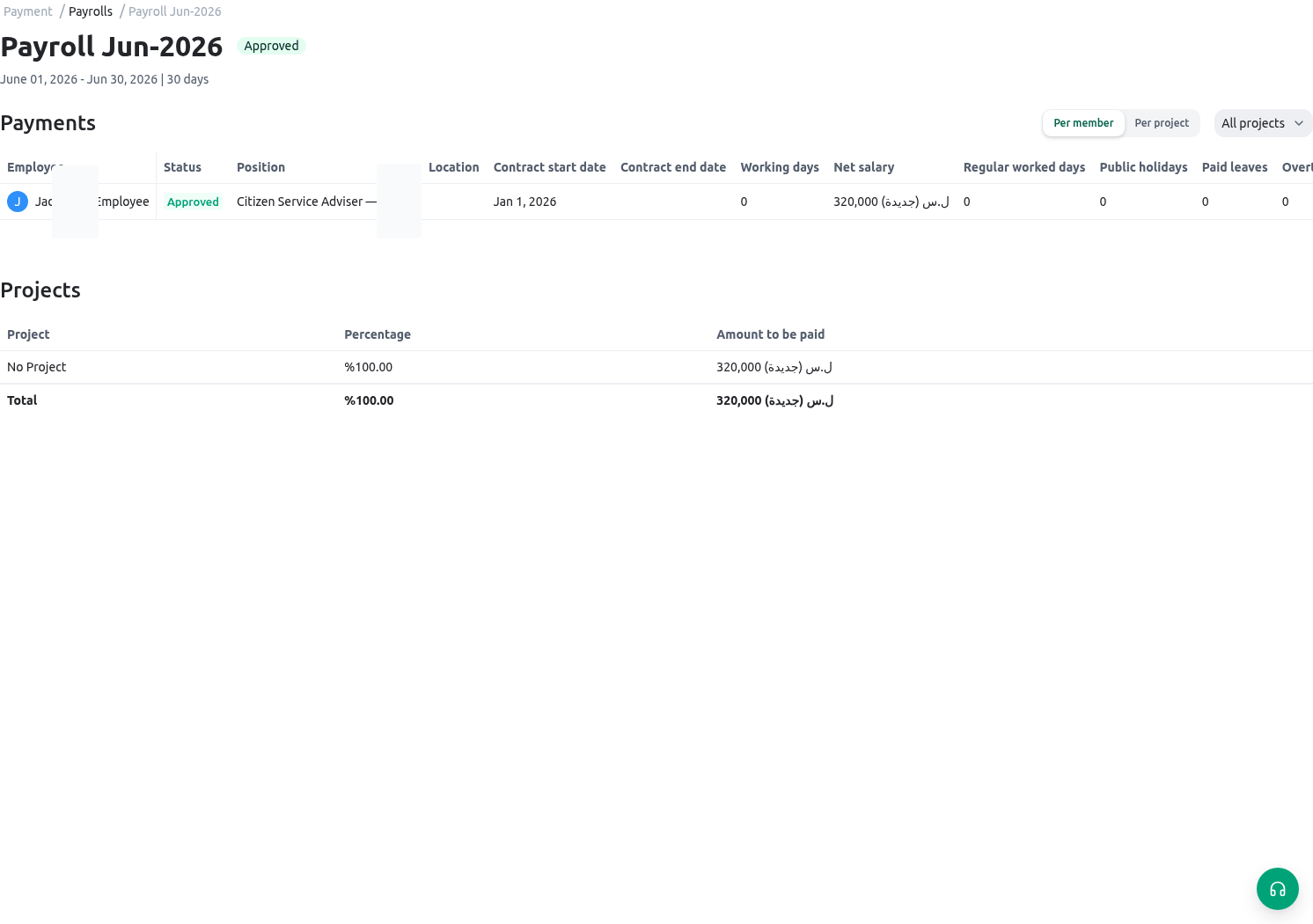
Related guides
- Configure compensation context in Salary scale.
- Record controlled adjustments in Bonuses and deductions.
- Review leave-related workforce data in Holidays and leave.